
Activity Feed brings together a large amount of data and events into a single chronological stream. The stream is made up of information tiles, here's information on the different types.
Contents
Company filings
Filings for issuers will be found in Activity Feed. Here's a couple of differences between the tiles for the US and Canada:
US filings will have the EDGAR code at the top as well as any detail from the form title below them. If there is a "period" reported for the filing, it will appear as a part of the date ribbon at the bottom right of the tile.

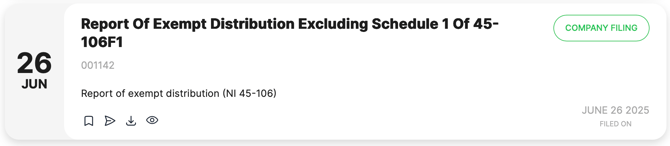
Canadian filings look slightly different with their more descriptive naming convention being shown in the title block of the tile and then the regulatory filing code below.
Soon, this code will be replaced with a short single sentence brief of what the filing contains.
Insider activities
Insider actions appear differently between Canada and the US. Both will appear within a company in the "Show All" or when "Insider Activities" are selected.
US insider actions currently show the same way as their company filings and show up with the badge of "INSIDER ACTIVITY" at the top right of the tile. US insider tiles appear for Form 3/3A, Form 4/4A, Form 5/5A or Form 144's.
US insider activities will soon appear similar to Canadian with their filings being distilled into sentence form so you can scan them quickly as you're looking. You will still be able to view the original source documents.

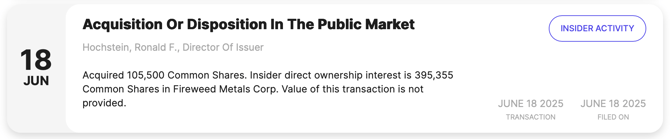
Canadian insider activities appear in sentence form. The type and length of sentence that appears on the tile depends on how much data was provided for the transaction by the insider. For Canadian filings from insiders, there is no source document provided by the regulator which is why you won't see the action ribbon on the bottom of the tile.
Dividends
Dividend data is delivered also in sentence form similar to Canadian insider data. Below is an example:

Symbol changes
Symbol changes will show when the same company has changed its' symbol as well as what the original and new symbol are.

Consolidations & splits
Consolidations and splits will tell you the ratio for the event, when it was announced and when it became effective.
Tip: Often, companies will do a consolidation or split event at the time (or near) the same time they do a name change or a listing change. Turn the Symbol Change and Consolidations & Splits filters on to see the events together.

Trading halts
Trading halt tiles will show halts, resumptions and the reason for the event (if it's available).
You may come across a company with multiple trading halt tiles stacked one on top of another, this is normal. Depending on the exchange and the reason for the halt (or other event) the exchange may send a daily halt event to us to confirm the issuer is still halted. This is normal.

Note: Historical trading halt data is difficult to gather. Some historical trading halt events may be missing from Activity Feed.